
Direct Inward Dialing (DID) is a phone system feature that allows businesses to give employees or departments their own direct phone numbers without installing separate physical phone lines. Calls reach the intended person instantly without passing through receptionists or phone menus.
As businesses grow, handling calls efficiently becomes critical. Missed calls, long wait times and manual call transfers can damage customer experience and productivity. DID solves these problems by simplifying call routing while reducing infrastructure complexity.
In this article you’ll learn what Direct Inward Dialing is, how it works, its real world use cases advantages limitations and when it makes sense to use it. So you can decide whether DID is the right communication solution for your business.
What Is Direct Inward Dialing (DID)?
Direct Inward Dialing (DID) is a telephony service that allows businesses to assign unique phone numbers to individual users or departments while using a shared external phone connection. Instead of requiring a separate physical phone line for each employee, DID enables multiple direct numbers to route through a centralized PBX or VoIP system.
When a caller dials a DID number the call is automatically routed to the intended recipient without passing through a receptionist or automated menu. From the caller’s perspective the experience is identical to calling a direct phone line while businesses benefit from reduced infrastructure costs and simplified call management.
DID is commonly used in modern VoIP and cloud phone systems to support scalable communication for businesses of all sizes.
How Does Direct Inward Dialing Work?
Direct Inward Dialing works by mapping external phone numbers to internal extensions within a phone system. The process typically involves the following steps:
Number Assignment
The service provider allocates a block of DID numbers to a business. Each number is assigned to a specific user team or function.
Call Routing via PBX or VoIP
Incoming calls are received by the provider’s network and routed through a PBX or cloud based VoIP system using SIP trunking.
Extension Mapping
Each DID number is mapped to an internal destination such as a desk phone softphone mobile app call queue or voicemail.
Call Delivery
The call rings the assigned device or follows predefined routing rules (business hours failover or forwarding).
This architecture allows dozens or hundreds of phone numbers to operate over a single internet connection or trunk rather than individual physical lines.
History and Evolution of Direct Inward Dialing
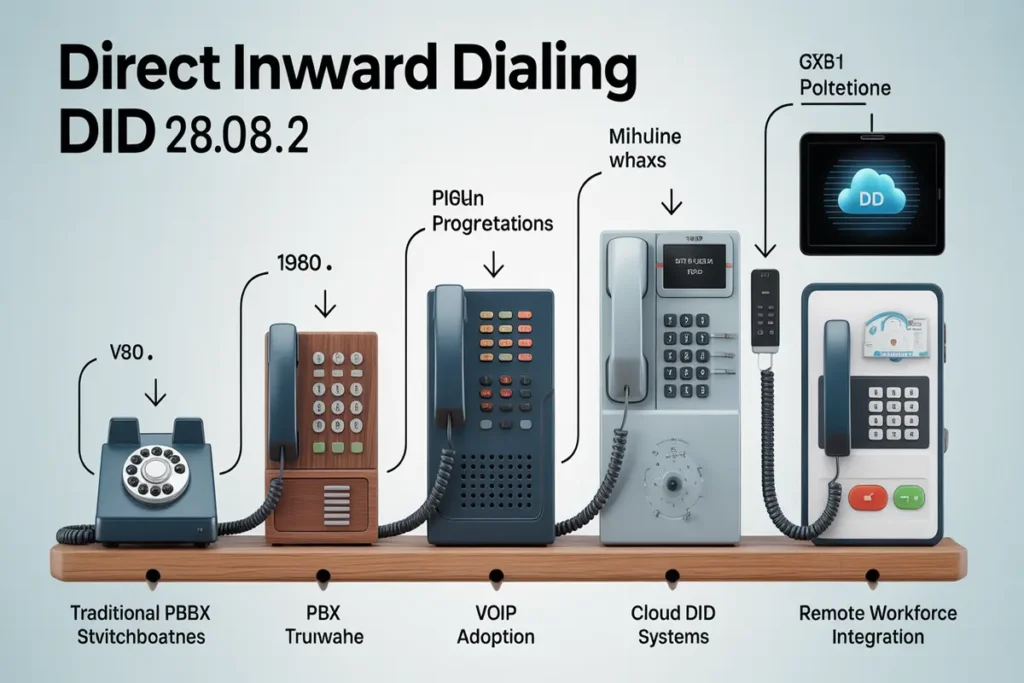
Direct Inward Dialing originated in traditional PSTN (Public Switched Telephone Network) environments where large organizations needed a way to give employees direct phone numbers without installing separate lines.
With the rise of VoIP and cloud telephony DID evolved from hardware dependent phone systems to fully software managed solutions. Today DID provisioning routing and management are handled through web based dashboards enabling instant scalability and remote accessibility.
Common Use Cases for Direct Inward Dialing
Direct Inward Dialing is used across multiple industries and business scenarios including:
- Sales Teams: Providing prospects with direct access to account managers
- Customer Support: Assigning department specific numbers for faster resolution
- Remote & Hybrid Teams: Allowing employees to receive business calls anywhere
- Multi Location Businesses: Centralizing phone systems across offices
- Professional Services: Enabling consultants lawyers and agencies to maintain personal business numbers
These use cases demonstrate how DID improves accessibility while maintaining professional communication standards.
Why Direct Inward Dialing Matters for SMBs?
Professional Business Image
Direct Inward Dialing creates enterprise level appearance for small businesses by providing department specific numbers (sales support billing) and direct employee lines. Customers perceive businesses offering direct staff access as more established and credible compared to competitors using single line systems or personal cell phones for business communication.
Efficient Call Routing
DID numbers streamline customer connections by eliminating phone tree navigation and receptionist transfers. Automated routing rules direct calls to appropriate departments or individuals based on the number dialed reducing average wait times by 42% and call transfer requirements by 58%. Receptionists focus on high value tasks rather than manual call routing responsibilities.
Cost Reduction
Organizations eliminate $35 $50 monthly costs per physical phone line by implementing DID numbers at $5 $12 per number. A 25 employee business saves $10500 $14100 annually switching from traditional lines to DID based communication. Additional savings include eliminated installation fees, equipment purchases and ongoing maintenance contracts.
Scalability for Growth
Cloud based DID provisioning supports instant scaling businesses add or remove numbers through web dashboards without service calls, installation appointments or infrastructure changes. This flexibility enables companies to provision DIDs for seasonal staff, new locations or rapid growth periods without telecommunications delays.
Direct Inward Dialing vs SIP Trunking
Although often mentioned together DID and SIP trunking serve different purposes.
| Feature | Direct Inward Dialing (DID) | SIP Trunking |
| Purpose | Provides individual phone numbers | Provides call capacity |
| Function | Routes calls to specific users | Connects PBX to carrier |
| Visibility | Customer facing numbers | Backend infrastructure |
| Dependency | Uses SIP trunks to function | Can exist without DIDs |
In practice DID numbers rely on SIP trunking to transport calls but they are not the same service.
Key Benefits of Direct Inward Dialing
- Direct phone numbers for employees and departments
- Reduced reliance on physical infrastructure
- Faster customer connections and improved responsiveness
- Location independent call handling
- Simplified management through web based tools
These advantages make DID a foundational component of modern business phone systems.
Limitations and Considerations of DID
While Direct Inward Dialing offers many advantages it is not without limitations:
- Internet Dependence: VoIP based DID requires stable internet connectivity
- Call Security: Improper configuration may expose systems to spam or fraud
- Number Management: Large DID inventories require organized administration
- Regulatory Compliance: Some regions impose registration or usage requirements
Understanding these limitations helps businesses deploy DID more effectively.
When Should a Business NOT Use DID?
Direct Inward Dialing may not be ideal if:
- The business receives very low call volume
- All calls must be screened by a receptionist
- There is no reliable internet connectivity
- The organization requires strict centralized call handling
In such cases simpler phone configurations may be sufficient.
Direct Inward Dialing vs Traditional Phone Lines
Traditional Phone Line Approach:
- One physical line per employee: $35 $50 monthly per line
- Installation requirements: Technician visits wiring hardware setup
- Limited to physical office locations
- Difficult scalability with installation delays
- Hardware dependent operation
- High total cost of ownership
Direct Inward Dialing with Contactivity:
- Multiple numbers through single VoIP trunk: $5 $12 per DID monthly
- Instant provisioning via web dashboard (minutes not weeks)
- Location independent operation (works anywhere with internet)
- Instant scalability (add/remove numbers in seconds)
- Device flexible (desk phones softphones mobile apps)
- 65% lower total cost of ownership
Sarah’s Consulting Firm Example: Sarah runs a 15 person consulting firm. Traditional phone lines cost $525 $750 monthly ($6300 $9000 annually). DID approach costs $75 $180 monthly ($900 $2160 annually) for 15 DID numbers plus base VoIP service. Annual savings: $4140 $6840.
Ian’s Distributed Team Example: Ian manages 50 employees across 3 locations. Traditional multi location phone system: $1750 $2500 monthly ($21000 $30000 annually). Unified cloud system with 50 DIDs: $250- $600 monthly ($3000 $7200 annually). Annual savings: $13800 $22800.
Transform Your Business Communication with Direct Inward Dialing
Direct Inward Dialing provides small and medium businesses with professional communication capabilities efficient call routing improved customer experience and 65% cost savings compared to traditional phone lines. contactivity.io delivers these benefits through cloud based infrastructure requiring no hardware investment offering instant provisioning and supporting unlimited scalability as businesses grow.
Organizations implementing DID reduce telecommunications costs while enhancing professional image streamlining customer connections and supporting remote team communication. The combination of affordability simplicity and enterprise level features positions Direct Inward Dialing as essential infrastructure for growing businesses.
Ready to enhance professionalism and reduce costs with Direct Inward Dialing? [Contact Contactivity today to start provisioning DIDs for your team]
How to Set Up DID Numbers with contactivity.io?
Setting up Direct Inward Dialing with Contactivity requires six straightforward steps completed in 15 30 minutes:
Access your Contactivity dashboard Log in at contactivity.io and navigate to “Phone Numbers” or “DID Management” section.
Select DID numbers to provision Choose area codes for local market presence select quantity matching employee or department needs and review available numbers.
Assign DIDs to users and departments Map each DID to specific employee extensions assign department DIDs to ring groups and configure backup destinations.
Configure routing rules Set business hours schedules define call forwarding rules to mobile or alternate numbers and establish queue priorities.
Test DID functionality Call each new DID from external phones to verify routing confirm correct employee/department connections and test after hours behavior.
Update business materials
Add DID numbers to business cards email signatures and website contact pages then inform customers of direct access numbers.
FAQs
What is the difference between DID and a regular phone number?
A DID number routes calls through shared VoIP infrastructure to specific users or departments without requiring separate physical lines while regular phone numbers traditionally rely on dedicated circuits. DID offers greater flexibility scalability and lower costs with the same call quality.
Can I keep my existing phone numbers when switching to DID?
Yes most providers support number porting allowing you to transfer existing phone numbers to a DID system while keeping the same numbers customers already know.
Do DID numbers work with mobile devices?
Yes DID numbers can ring on mobile apps softphones and desk phones enabling employees to answer business calls from smartphones while keeping personal numbers private.
What happens to DIDs if the internet connection fails?
DID systems typically include failover options that automatically forward calls to backup numbers voicemail or alternate locations during internet outages.
How quickly can new DIDs be provisioned?
New DID numbers can usually be provisioned instantly or within minutes through an online dashboard without hardware installation or technician visits.
What area codes are available for DID numbers?
DID numbers are available in most local US and Canadian area codes along with toll free options and international numbers in many countries.
How does DID pricing compare to traditional business phone lines?
DID numbers are significantly more affordable than traditional phone lines as multiple numbers operate over a single VoIP connection without hardware or installation costs.
Can DID numbers have custom voicemail greetings?
Yes each DID number can have its own customized voicemail greeting with options like voicemail to email and message transcription